
Download Proshow Standard – slideshow maker, photo slideshow, video editing, multimedia presentation, Windows app
Overview
Proshow Standard is a Windows-based application designed to simplify the creation of visually engaging slideshows using photos and videos. The app targets individuals and professionals seeking a straightforward tool to compile multimedia content into polished presentations. Whether used for personal memories, family events, or business pitches, Proshow Standard streamlines the process of combining visual media with transitions and audio.
Its primary purpose is to reduce the complexity of slideshow creation, making it accessible to users with varying levels of technical expertise. The developer, Photodex, has positioned this tool as a reliable solution within the productivity category, particularly for Windows users who need a dedicated multimedia presentation utility. Real-world use cases include creating wedding slideshows, school project presentations, or promotional content for small businesses.
Despite being released in 2007, the app remains relevant for users who prefer a desktop-based workflow over cloud or mobile alternatives. The developer did not provide additional technical details about updates or future development plans. However, its continued presence in the productivity ecosystem underscores its stability and utility for specific user needs.
Key Features & Functionality
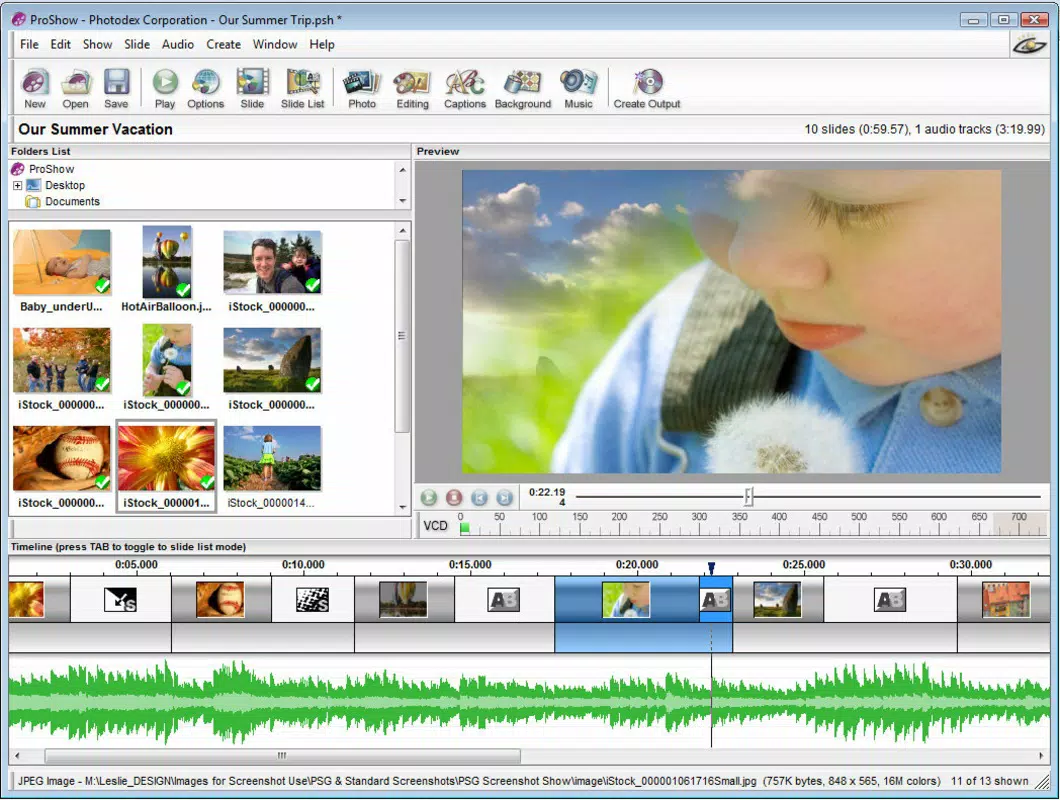
- Intuitive Slideshow Creation: The app offers a user-friendly interface that enables users to import photos and videos directly into a timeline-based workspace. Even beginners can navigate the layout and begin assembling content without prior experience in video editing.
- Real-Time Preview: As transitions and effects are applied, users can view the results instantly, allowing for immediate feedback and adjustments. This feature reduces trial-and-error and improves the overall efficiency of the editing process.
- Diverse Transition Effects: Proshow Standard includes a wide selection of built-in transitions, such as fades, wipes, and 3D effects. Each effect can be previewed before application, helping users align the visual style with their intended message.
- Audio Integration: Users can seamlessly add background music, narration, or sound effects to their slideshows. The app supports common audio formats and allows volume adjustments to balance media elements.
- Windows Optimization: Built specifically for the Windows platform, the application leverages native OS capabilities to ensure smooth operation. It is designed to run efficiently on standard desktop configurations without requiring high-end hardware.
For example, a user creating a birthday slideshow can import images, apply a fade transition between each photo, add a favorite song, and preview the entire sequence in real time before finalizing. Similarly, a teacher preparing a class presentation can combine video clips with still images and audio explanations to deliver a dynamic learning experience.
Interface, UX & Performance
The user interface of Proshow Standard is structured around a clean, linear layout that separates media import, editing, and output settings. Navigation is primarily mouse-driven, with clearly labeled panels for media library, timeline, preview window, and effect controls. The visual style is minimalistic, focusing on functionality over decorative elements.
Users can organize their media files in folders within the app, facilitating quick access during editing. Although the developer did not list formal performance metrics, the application appears to operate smoothly on standard Windows systems. The real-time preview function suggests optimized rendering, though performance may vary depending on system specifications and media file complexity.
Responsiveness is consistent during basic operations such as drag-and-drop media placement and effect application. Stability appears reliable for typical use cases, though no information was provided about crash rates or long-term usage behavior. The app does not include cloud sync or mobile compatibility, reinforcing its role as a standalone desktop utility.
Platform Compatibility & Technical Requirements
Proshow Standard is designed exclusively for the Windows operating system. It is compatible with Windows versions released after 2007, though specific OS requirements were not listed by the developer. The app has a file size of 114.7 MB, indicating a lightweight installation that does not impose significant storage demands.
Users can expect a standard installation process, with no reported dependencies beyond the base OS. The software version is 8.0.0.1, suggesting a mature release with established features. Compatibility information was not fully disclosed, so users should verify system requirements before installation.
The app is not available for Android, iOS, or other mobile platforms. As a desktop application, it is intended for use on laptops and desktop computers running Windows.
Pros and Cons
Pros
- Simple, intuitive interface suitable for beginners and non-technical users.
- Real-time preview allows for immediate visual feedback during editing.
- Wide variety of transition effects with pre-visualization capabilities.
- Supports audio integration to enhance multimedia storytelling.
- Lightweight file size and optimized for Windows desktop environments.
Cons
- Not available on mobile platforms such as Android or iOS.
- No cloud storage or cross-device synchronization features.
- Developer did not provide updated system requirements or compatibility details.
- Released in 2007, which may raise concerns about long-term support.
- Limited to Windows, excluding users of macOS and other operating systems.
FAQ
Is Proshow Standard available for free?
Proshow Standard is not a free application. It is available for purchase at a price of $29.95. Users seeking a free alternative may need to explore other slideshow tools.
Can I use Proshow Standard on my mobile device?
No, Proshow Standard is a Windows-based desktop application and is not compatible with mobile devices such as Android or iOS smartphones and tablets.
What operating systems does Proshow Standard support?
The app is designed for Windows. Specific OS versions were not listed by the developer, so users should ensure their system meets general Windows compatibility standards.
Does Proshow Standard support video editing beyond slideshows?
While the app allows users to combine video clips with photos, its primary function is slideshow creation. Advanced video editing features such as trimming, cropping, or color grading are not highlighted in the provided information.
How do I update Proshow Standard?
Information about update mechanisms was not provided. Users should consult the official Photodex website or support resources for the latest version and patch details.
Final Thoughts
Proshow Standard remains a dependable tool for users who prioritize ease of use and visual polish in their multimedia presentations. Its focus on real-time preview, diverse transitions, and audio integration makes it a practical choice for both personal and professional projects. While its age and lack of mobile availability may be limiting factors, its stability and desktop optimization continue to serve a niche audience effectively.
For Windows users seeking a no-frills slideshow maker that delivers consistent results, Proshow Standard offers a clear value proposition. The app’s lightweight design and straightforward workflow make it ideal for those who want to create compelling presentations without investing in complex software. Download Proshow Standard now


